Ending the 'Non-stop Phone Calls': Security Company's Self-Developed Management System 'Security Sign' Now Generally Available
~In-house operation reduced assignment tasks from 3 hours to 30 minutes daily. AI automatic assignment and smartphone integration fundamentally change security company management operations~
📋 Article Processing Timeline
- 📰 Published: April 2, 2026 at 21:02
MFP Co., Ltd. (Headquarters: Sapporo, Hokkaido) has begun general provision of "Security Sign," a cloud management system for security companies.
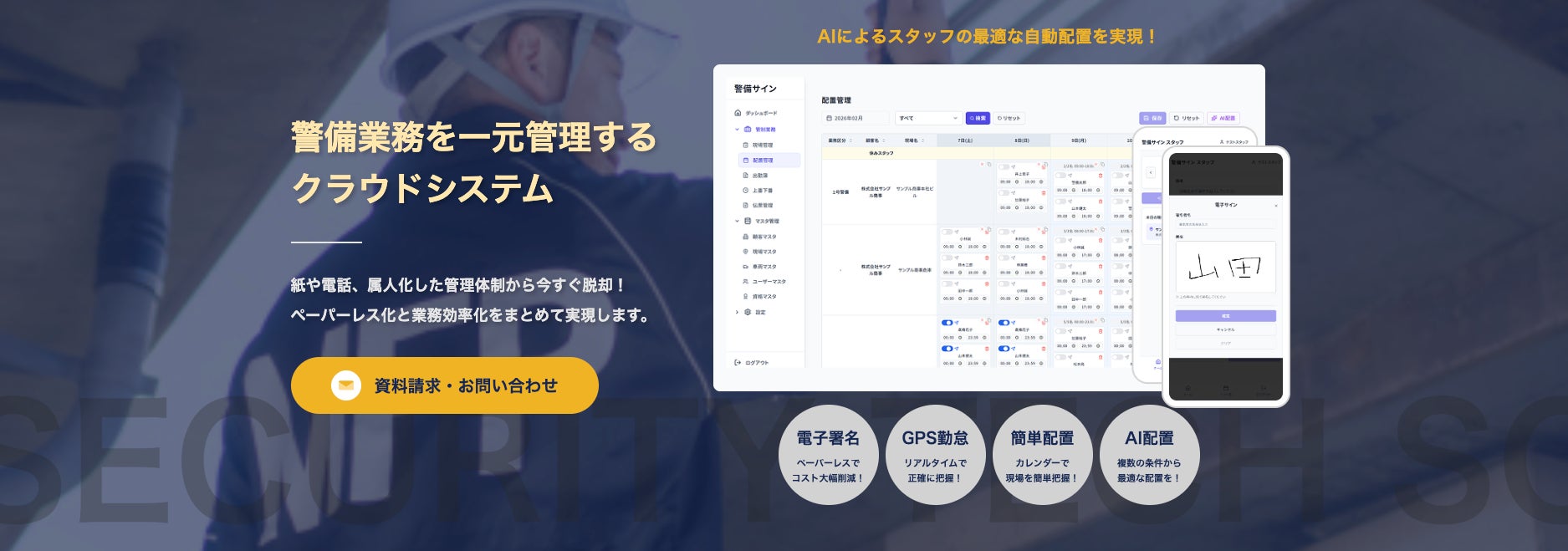
■ Why are security company managers working overtime every day?
Many management operations in the security industry still rely on phone, fax, and paper.
・Calling each person to confirm, "Who can go to tomorrow's site?"
・Creating assignment schedules by mentally combining guard qualifications, holiday requests, and compatibility with sites.
・Circulating documents on paper and returning to the office for approval stamps.
Managers are daily overwhelmed by these tasks, and it's not uncommon for assignment work alone to take over 3 hours. "There must be a better way," they think, but they can't find a tool that fits the industry—this is the reality for many security companies.
■ "That's why we built it ourselves."
MFP, which developed "Security Sign," is also a company that operates its own security business.
Even after trying commercially available management tools and SaaS, none fit the unique workflow of the security industry (daily changing assignments, qualification requirements, site-specific compatibility, last-minute absence handling).
"Only those on the ground can create something truly usable on the ground."
Based on this idea, the system developed to streamline their own management operations is now being offered to other security companies facing similar challenges.
■ Changes before and after implementation
*The following figures are based on MFP's internal operational results.
Assignment tasks: Over 3 hours/day → Approx. 30 minutes/day
Shift communication: One by one via phone → Automatic notification to smartphone
Attendance confirmation: Phone or site patrol → GPS one-tap reporting
Document approval: Paper stamp → Circulation → Electronic signature on smartphone or tablet
Daily report creation: Handwritten → Transcription → Automatic generation
■ 4 main features
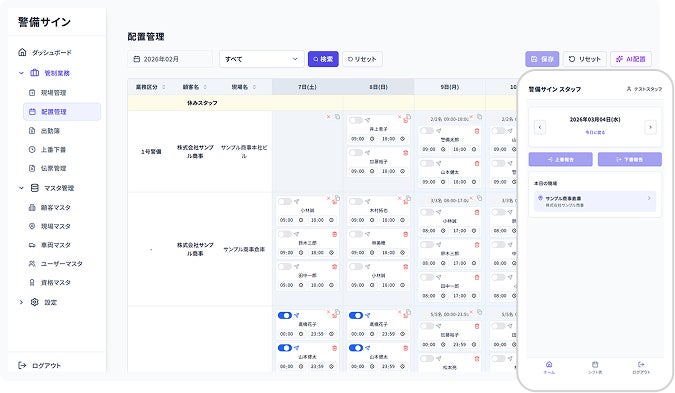
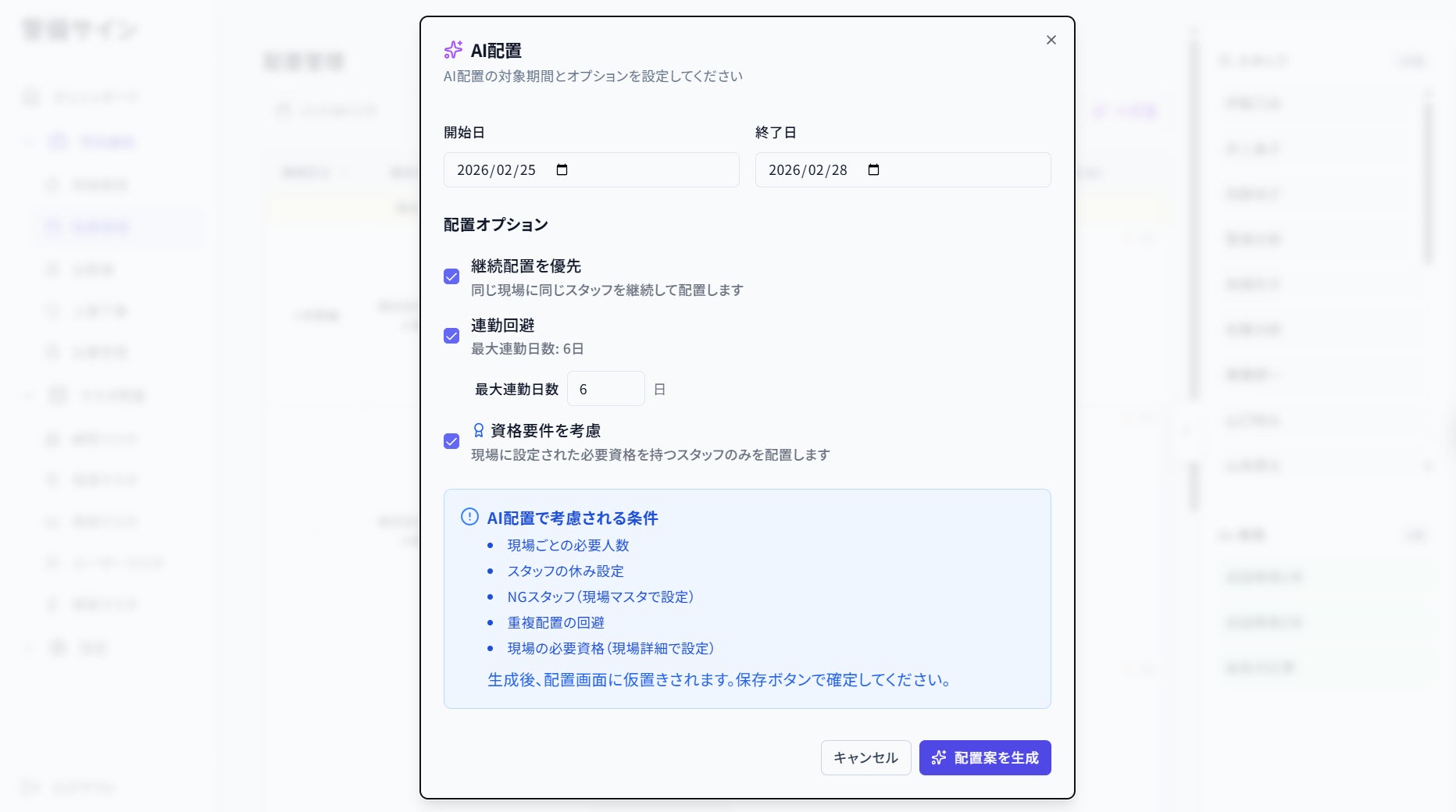
① AI Automatic Assignment
AI automatically considers guard qualifications, holiday requests, required personnel at sites, and continuous work restrictions to create optimal assignment proposals. Managers only need to confirm and make minor adjustments.
② Smartphone-based communication
Assignment notifications, shift confirmations, attendance reports—all completed on a smartphone. Eliminates the need for phone calls to guards.
③ Intuitive UI
Designed with "usability for staff unfamiliar with IT" as the top priority. Calendar-format assignment screens, drag-and-drop operations, etc., allow users to start without a manual.
④ Electronic Signature
Site managers can complete approvals by simply signing on a smartphone or tablet. History is automatically recorded, achieving both paperless operations and internal control simultaneously.
■ 3 reasons why "Security Sign" is chosen
1. Security-specific — Standard support for complex rules of security operations that general-purpose tools cannot handle.
2. In-house operation — MFP, the developer, uses it daily, reflecting bugs and improvement requests at the fastest speed.
3. Monthly improvements — Incorporates feedback from client companies and continues monthly updates.
■ User Voices
Manager (MFP internal):
"Before, I used to come to work at 6 AM to create assignment schedules and then make dozens of phone calls. Now, AI provides assignment proposals the night before, so in the morning, I just confirm and make minor adjustments. Honestly, I can't go back to the old way."
Guard staff:
"The hassle of not being able to answer the phone, calling back, and still not getting through is gone. A notification comes to my smartphone, and I can see it. That alone makes a huge difference in stress."
"Security Sign" is not a system that ends with its release. Since MFP itself uses this system for daily operations, feedback like "this is hard to use" or "I want this feature" reaches development in real-time. Including feedback from client companies, improvements are continuously made through monthly updates.
■ Pricing — Pay-as-you-go, starting from small scale
Initial setup fee: 200,000 yen (excluding tax)
Monthly usage fee: 500 yen/person (excluding tax)
・For 30 guards: 15,000 yen/month
・For 100 guards: 50,000 yen/month
*The pricing is designed to be fully recouped by savings in phone bills, paper costs, and overtime pay.
■ Implementation Flow
STEP1: Inquiry/Demo guidance
STEP2: Initial setup tailored to your company's workflow (MFP will perform on your behalf)
STEP3: Operation explanation for staff (online support available)
STEP4: Start operation/Regular follow-up
To prevent "implemented but no one uses it," MFP will perform the initial setup on your behalf.
■ Future Developments
We are proceeding with compatibility for various AI-related subsidy programs, and once eligible subsidies are confirmed, we plan to provide application support to client companies.
■ Company Overview
Company Name: MFP Co., Ltd.
Location: Katayama Building, 5-1-6 Toyohira 4-jo, Toyohira-ku, Sapporo, Hokkaido 062-0904
Phone Number: 011-823-7901
Business Activities: Security business, cloud service development and operation
■ Contact Us
MFP Co., Ltd. Security Sign Department
TEL: 011-823-7901
Demo applications and material requests are accepted via the service website.
FAQ
What kind of system is Security Sign?
Security Sign is a cloud management system that streamlines security company assignment tasks, attendance management, and document approvals using AI and smartphone integration.
How much can operations be streamlined by implementing it?
Within MFP, assignment tasks were reduced from over 3 hours daily to about 30 minutes, and phone calls and paper-based approvals became unnecessary.
Can staff unfamiliar with IT use it?
It is designed with an intuitive UI, allowing staff to start using it without a manual through drag-and-drop operations and other features.