'Money Forward Cloud Consolidated Accounting' Launches Data Integration Add-in Function for Excel
Key facts
- 'Money Forward Cloud Consolidated Accounting' Launches Data Integration Add-in Function for Excel
- Money Forward launches an add-in function that allows users to directly handle consolidated accounting data in Excel.
- Source: PR Times
- Date: April 1, 2026
Direct answer
Money Forward launches an add-in function that allows users to directly handle consolidated accounting data in Excel.
- Citation
- 'Money Forward Cloud Consolidated Accounting' Launches Data Integration Add-in Function for Excel (April 1, 2026), PR Times
- Source
- PR Times
- Date
- April 1, 2026
Money Forward launches an add-in function that allows users to directly handle consolidated accounting data in Excel.
📋 Article Processing Timeline
- 📰 Published: April 1, 2026 at 00:00
- 🤖 AI Analyzed: June 2, 2026 at 12:56 (1500h 56m after Published)
Money Forward, Inc. has launched the "Data Integration Add-in Function for Excel" (hereinafter referred to as "Excel Add-in") for its "Money Forward Cloud Consolidated Accounting" service. This new feature enables users to retrieve and update consolidated financial closing data directly within Excel. By leveraging the familiar Excel environment as a starting point, this function streamlines analysis and report creation, supporting enhanced decision-making for enterprise companies.
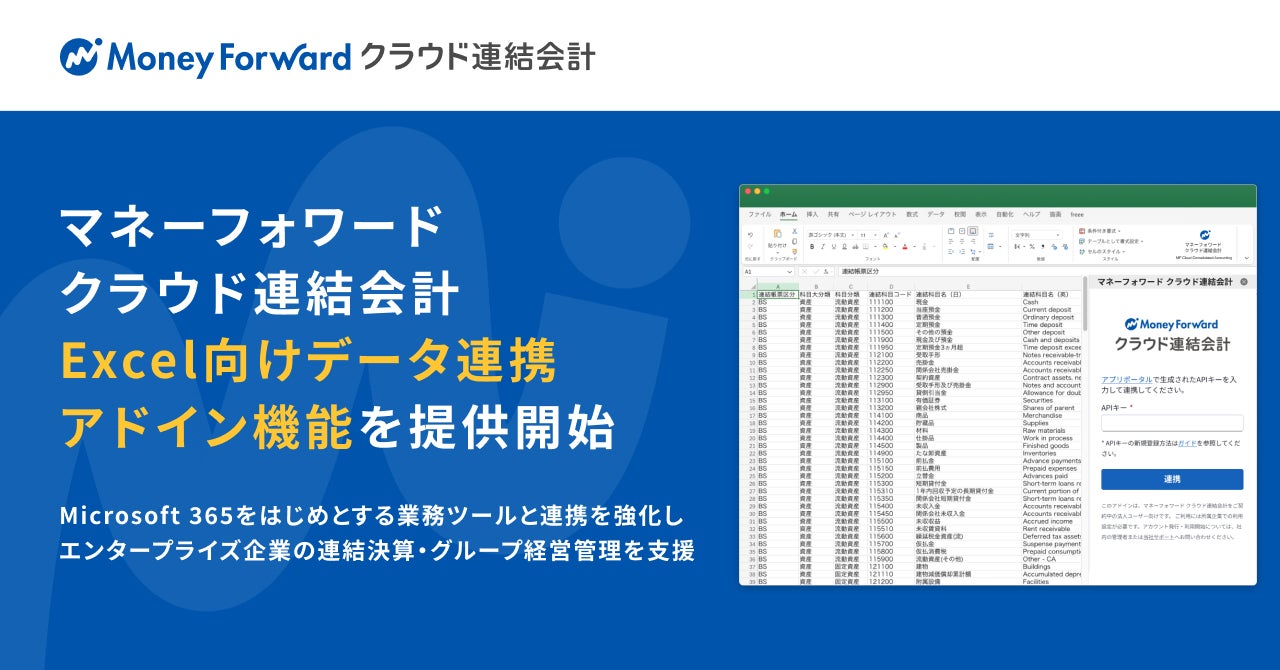
The "Excel Add-in" is an add-in function that allows direct retrieval of consolidated accounting data from "Money Forward Cloud Consolidated Accounting" within Excel. Developed using Microsoft's Office Add-in platform, it provides an environment for quickly obtaining and utilizing accurate business data. It can be seamlessly integrated into existing Excel templates and analysis workflows, facilitating smooth reporting and drill-down investigations. Furthermore, when combined with generative AI features like Microsoft 365 Copilot, it can streamline the entire process from data retrieval to analysis and documentation.
Moving forward, "Money Forward Cloud Consolidated Accounting" will continue to strengthen its integration with business tools such as Microsoft 365, expanding the data utilization experience optimized for the business environment of enterprise companies.
Please check here for details on this function.
URL: https://biz.moneyforward.com/support/consolidated-accounting/guide/excel-add-in01.html
■ Comment from Tadashi Okazaki, Corporate Officer, General Manager of Cloud & AI Solution Business Headquarters, Microsoft Japan Co., Ltd.
I am delighted to welcome the launch of the data integration add-in function for Excel in "Money Forward Cloud Consolidated Accounting."
This function enables many companies that regularly use Microsoft 365 and Excel to seamlessly acquire, analyze, and report consolidated accounting data. Furthermore, by integrating with Microsoft's AI technology, it will enhance management and decision-making processes, guiding corporate decisions to the next stage.
Microsoft Japan will continue to strengthen the integration between Microsoft products, including Microsoft 365 and Microsoft 365 Copilot, and the various services of "Money Forward Cloud," and together support corporate business transformation and value creation through data utilization and AI utilization.
■ Features of "Excel Add-in"
・Direct Authentication and Consolidated Data Retrieval within Excel
Various data such as consolidated statements, segment statements, cash flow statements, and master data can be directly retrieved from within Excel. Bulk retrieval of data for multiple periods is also possible.
・Flexible Data Placement and Condition Saving
Data can be placed starting from any cell in Excel, allowing existing templates and macros to be used as they are. Retrieval conditions can be saved, enabling updates to the latest data with a single click next time.
・Streamlined Exploratory Analysis
Smooth drill-down investigations and report creation can be performed within the familiar Excel environment, significantly reducing the man-hours from data acquisition to document creation.
■ Background of Provision
There is a continued high demand, particularly among enterprise companies, for analysis and report creation using Excel for consolidated financial closing and group management, due to constraints from internal policies and business environments.
By strengthening integration with Microsoft's product ecosystem, we aim to promote the utilization of Money Forward's business data within the tools companies use daily. It is in this context that we are now offering the "Excel Add-in."
■ About "Money Forward Cloud Consolidated Accounting"
"Money Forward Cloud Consolidated Accounting" is a consolidated accounting system that streamlines data collection and file management for group companies and visualizes management status in real-time. It not only automatically collects data through API integration with "Money Forward Cloud Accounting" and "Money Forward Cloud Accounting Plus" but also supports importing Excel files, making it usable even if you are using other accounting systems.
URL: https://biz.moneyforward.com/consolidated-accounting/
■ About Money Forward, Inc.
Name: Money Forward, Inc.
Location: msb Tamachi, 3-1-21 Shibaura, Minato-ku, Tokyo, Tamachi Station Tower S, 21F
Representative: Yosuke Tsuji, President, Group CEO
Established: May 2012
Business Description: Platform Service Business
URL: https://corp.moneyforward.com/
* Company names and product/service names (including logos) mentioned are trademarks of their respective companies or registered trademarks of their rights holders.
* Microsoft, Microsoft 365 are registered trademarks or trademarks of Microsoft Corporation in the United States and/or other countries.
* Microsoft 365 is the service name provided by Microsoft Corporation.
FAQ
What is the "Data Integration Add-in Function for Excel"?
It is a function that allows you to directly retrieve and update consolidated financial closing data from "Money Forward Cloud Consolidated Accounting" within Excel, which you are familiar with. It is provided as a Microsoft Office Add-in.
What are the benefits?
It streamlines analysis and report creation in Excel, significantly reducing the man-hours from data acquisition to report creation. Furthermore, combining it with generative AI features like Microsoft 365 Copilot can lead to further efficiency gains.
Which companies are the main target users?
The main target users are companies, particularly enterprise companies, that utilize Excel for consolidated financial closing and group management.
Are there any special settings required for use?
It is developed using Microsoft's Office Add-in platform, and can be used by enabling the add-in within Excel. Please refer to the provided URL for detailed setup instructions.