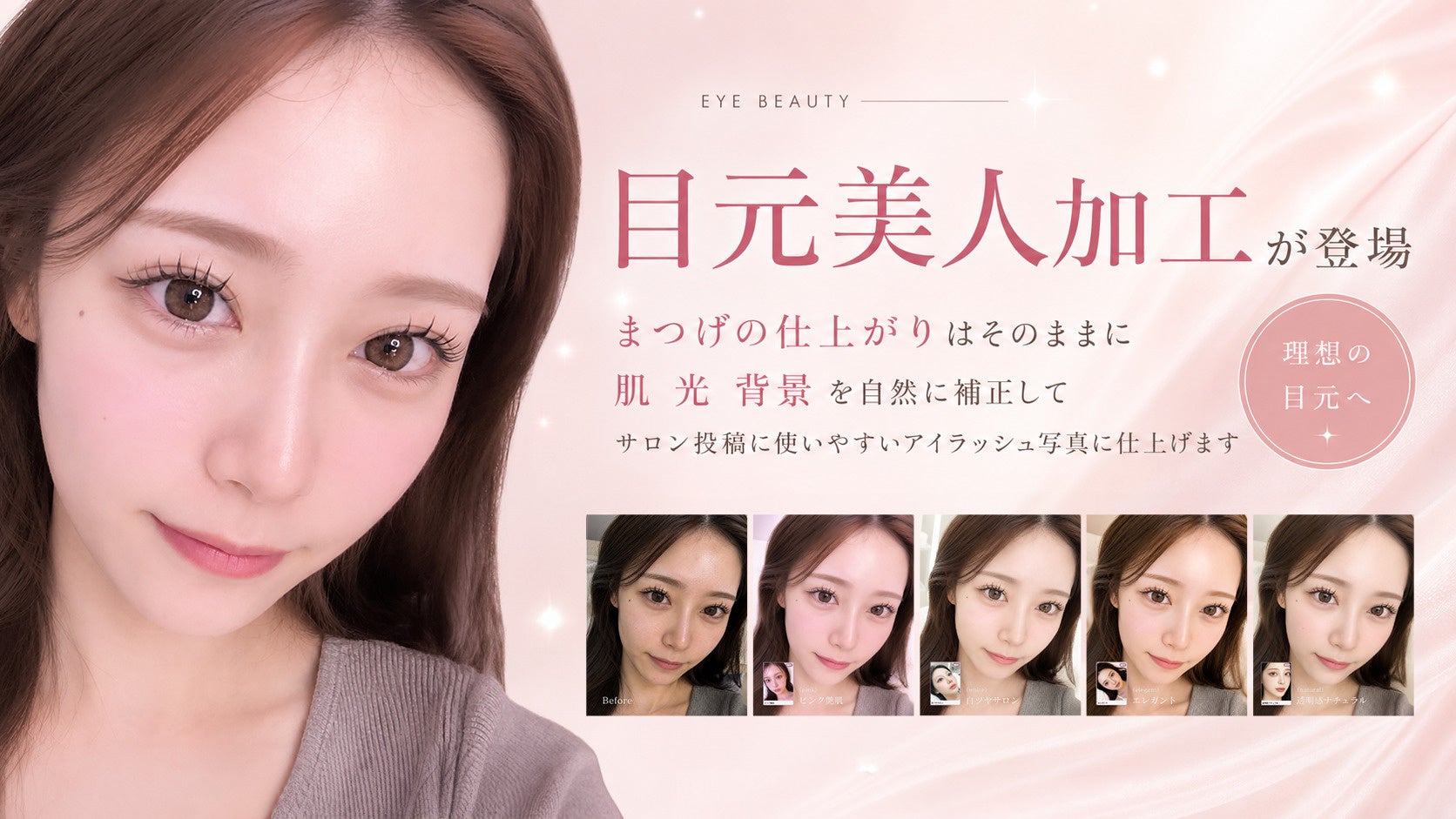
Sai Co., Ltd. (Location: Nishi-ku, Osaka City, Osaka Prefecture; Representative: Masaya Katano) has launched the new 'Eye Area Beauty Edit' feature for its AI photo editing service for beauty salons, 'Rakusha'.
'Eye Area Beauty Edit' allows users to upload photos after eyelash treatments and select a theme that matches the salon's aesthetic to generate eye-area photos suitable for Instagram posts, menu introductions, booking sites, and website掲載.
For eyelash salons, it is important to continuously share photos of finished treatments on social media and booking sites.
However, photos taken with smartphones often retain issues such as poor lighting, redness of the skin, bloodshot whites of the eyes, and a sense of everyday life in the background, which can make post-processing time-consuming.
Furthermore, customers being photographed may feel anxious about 'how they will be featured,' making it difficult to grant permission for online publication.
Rakusha's 'Eye Area Beauty Edit' focuses on adjusting the skin, lighting, and background for salon posts without significantly altering the impression of the treatment results, such as the curl, length, density, and fullness of the eyelashes.
The aim is to create a natural-looking photo that is easy to use as a post-treatment image, rather than an overly altered, unrecognizable result.
Photo taken by staff with an iPhone
Pink glossy skin atmosphere
Transparent natural atmosphere
White glossy salon atmosphere
Key Features of Eye Area Beauty Edit
Natural correction while maintaining eyelash finish Adjusts brightness and cleanliness for easy viewing in posts while preserving eyelash curl, length, density, and eye composition.
Retouches skin, whites of eyes, and background for salons Finishes with an impression suitable for eyelash salon treatment examples by suppressing skin texture and redness, bloodshot whites of the eyes, and the darkness and everyday feel of the background.
Adds ring light-style catchlights to the eyes Adds a ring light-like reflection to the pupils, characteristic of salon photography, to naturally enhance the eye area's impression.
Selectable from 4 themes Choose the finish that matches your salon's atmosphere and posting tone from 'White Glossy Salon,' 'Transparent Natural,' 'Elegant,' and 'Pink Glossy Skin.'
Supports Korean-style bluish-pink makeup As an additional option, 'Korean-style bluish-pink makeup' can be selected to naturally add details like tear bags, lower eyelids, blush, and glossy lips.
Reproduces makeup for fashion-conscious women
Usage Scenarios 'Eye Area Beauty Edit' can be utilized for the daily content of eyelash salons.
・Instagram posts ・Menu photos for booking sites and coupon sites ・Treatment examples for website掲載 ・Advertising and campaign materials ・Creation of staff portfolios ・Unifying the overall posting tone of the store
How to Use After logging into Rakusha, simply upload the post-treatment photo on the 'Eye Area Beauty Edit' screen and select a theme and correction options to generate the image. The first image can be experienced for free, and continued use is available with the Pro Plan and Business Plan.
About Rakusha Rakusha is an AI photo correction and advertising image generation service for hairdressers and beauty salons. It enhances photos taken with smartphones to a quality suitable for SNS posts, websites, advertisements, and menu introductions.
Currently, it offers features such as 'Professional Finish' and 'Matching Edit' for hair salons, 'Ad Image Generation' for customer acquisition materials, and 'Eye Area Beauty Edit' for eyelash salons. It supports the daily photo creation needs of beauty salons comprehensively, from shooting and correction to the creation of posts and advertising materials.
Service Site: https://rakusha.sai-beauty.jp/ App: https://app.sai-beauty.jp/
FACT BOX
- Source: PR TIMES
- Category: サービス開始